
Why UHR Decoder
Decode. See. Log. One window.
UHR Decoder is a modern FT8 and FT4 operating companion. It runs on its own with a built-in decoder, or alongside JTDX, WSJT-X or MSHV over UDP, and adds the tools those programs leave out, so you do not need a separate logger, map or spotting tool.
Beta. Version 1.3.10 for Windows 10 or 11. Free to try.
Ten reasons to try it
01 A call roster that tells you what you need
Every station heard is flagged as a new DXCC, new band or new grid, with distance, bearing and SNR. Filter it to CQs, or to needed stations only.
02 Maps built in
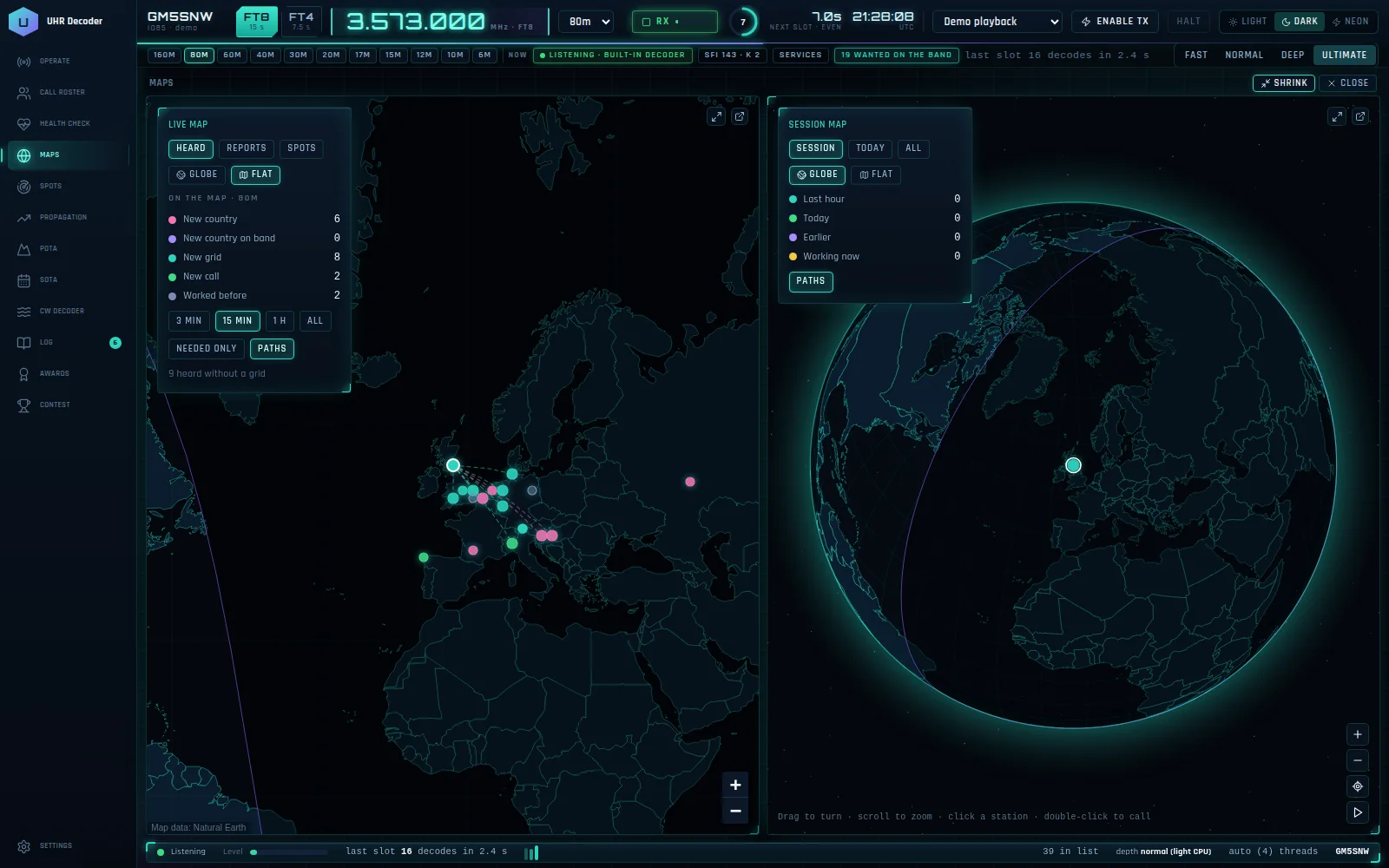
A live map of stations heard, PSK Reporter reports and spots sits beside a session map. The session map shows this session's contacts and trails, and zooms to the station you are working.
03 Spots and activations
DX cluster, POTA and SOTA in the same window, with click to tune.
04 Propagation
Solar data, band conditions and a propagation map, without opening a browser.
05 Logging and confirmations
QRZ, LoTW, eQSL and QSL Master are supported. Each online service has a Test button that goes green when it connects, and a health check shows every service at a glance.
06 Alerts
A wanted-calls list, new-DXCC and confirmation alerts, and desktop notifications.
07 A familiar layout
Waterfall, Band Activity, Sequence, Stations Heard and QSO panel, with a tool sidebar that opens each tool beside them. Any panel can be popped out to its own window, handy on more than one monitor.
08 Looks good
Dark, Light and Neon themes, so it suits a bright desk or a dark shack.
09 Two editions
The full UHR Decoder, and UHR Decoder Lite for slower PCs. Lite is decoder, UDP and log only, with a low-CPU mode, for people who use other logging software.
10 Free to try
It uses your existing rig control, and transmit and CAT go through OmniRig. It never replies to CQ automatically.
Keep what you already use
Works with JTDX, WSJT-X and MSHV
Not ready to switch decoders? Send their decodes to UHR Decoder over UDP and use it as your roster, maps, spots and logging screen. It can also pass decodes on to other tools. Built-in decoder or yours, the choice is yours.
Full or Lite?
| Feature | UHR Decoder | UHR Decoder Lite |
|---|---|---|
| Built-in decoder, waterfall and QSO panel | Yes | Yes |
| Takes decodes from JTDX, WSJT-X or MSHV over UDP | Yes | Yes |
| Contest mode with its own log | Yes | Yes |
| Logging and online confirmations | Yes | Yes |
| Dark, Light and Neon themes | Yes | Yes |
| Call roster and health check | Yes | Yes |
| Live map and session map | Yes | No |
| DX cluster, POTA, SOTA and CW decoder | Yes | No |
| Propagation | Yes | No |
| Awards tracking | Yes | No |
Questions
Is it better than JTDX or WSJT-X?
It is a different kind of tool. UHR Decoder has its own from-scratch decoder, but the main idea is that it also gives you the roster, maps, spots, propagation, awards and logging that those programs leave to other software. If you prefer your current decoder, keep it and let UHR Decoder take its decodes over UDP.
Can I use it alongside JTDX, WSJT-X or MSHV?
Yes. Point their UDP server at UHR Decoder and it becomes your roster, map and logging screen. Their own transmit and sequencing stay switched on in the other program.
Does it support FT4 and FT2?
FT8 and FT4 are there. FT2 is not built yet.
Will it reply to CQ calls by itself?
No. It never replies to CQ automatically.
Which radios does it work with?
It uses your existing rig control. Transmit and CAT go through OmniRig, and Hamlib rigctld is also available.
Which edition should I choose?
Choose UHR Decoder for everything in one window. Choose UHR Decoder Lite if your PC is older or busy, or you already log with other software.
Is it finished?
It is in beta. The Windows build, the online service links, OmniRig transmit and the UDP link are still being tested on air and against the real servers, so please tell me what you find.
Keep the Ultimate suite free
Every Ultimate programme is built and supported in my spare time. If they make your operating better, a donation helps cover development and testing.